
Changing URLs is the riskiest part of any site migration, because each old address carries rankings and backlinks that stop counting the moment it returns a 404. Good URL migration SEO comes down to one job: sending Google and your visitors from every old URL to the right new page, with a single permanent redirect and no guesswork in between. We run that process on client migrations, from the redirect map through a 90-day monitoring window, and the recovery data from SALT.agency and Google sets the timelines we plan around.
Key takeaways
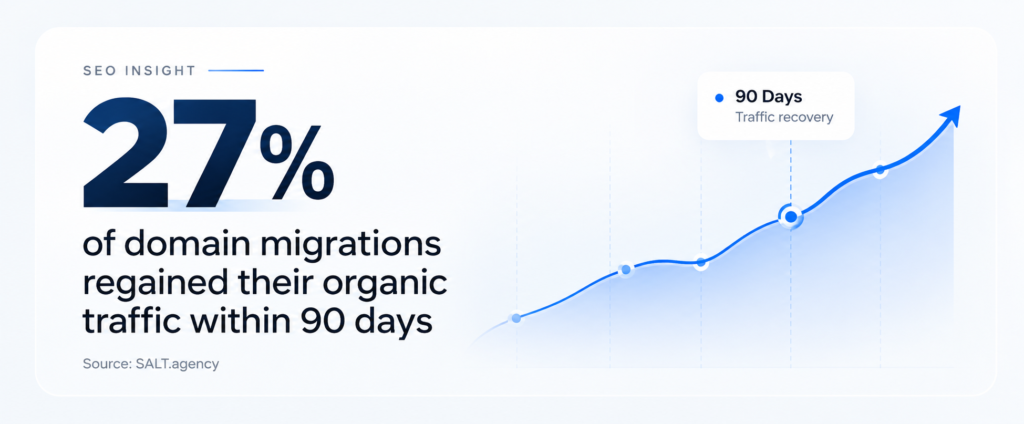
- Recovery is slow. Only 27% of the 1,052 migrations SALT.agency tracked regained their traffic within 90 days.
- The redirect map decides the outcome. Build it from a crawl plus Search Console and backlink data, one old URL to one new URL.
- Use server-side 301 or 308 redirects. Google reads 302 and 307 as weak signals, so temporary redirects keep old URLs indexed longer.
- Keep redirects for at least a year. Google’s own guidance sets that floor; we default to keeping them indefinitely.
Table of Contents
Does Changing Urls During A Migration Hurt SEO?
Yes, for a while, and often for longer than teams plan for. SALT.agency tracked 1,052 domain migrations and found that only 27% recovered their pre-migration organic traffic within 90 days (SALT.agency). That puts a URL change squarely in the category of multi-month projects, and the traffic forecast should carry a dip from day one.
Google says much the same in its own documentation. The site move guide warns that a medium-sized website can take a few weeks or more (Google Search Central) before new URLs replace old ones in results (larger sites take longer). Rankings can also fluctuate while Google recrawls and reindexes everything.
The migrations that bounce back fastest are the boring ones.
SALT’s analysis found that quick recoveries lined up with minimal content changes and a preserved URL structure, content and internal linking (SALT.agency), while the slow ones usually involved heavy content restructuring at launch. Our default play follows from that. If a URL does not need to change, we leave it alone, and when it does, we change the URL and nothing else in the same release (copy and template changes can follow a month later, once Google has settled).
In the same dataset, 13.9% of migrations showed no full traffic recovery after three years (SALT.agency). We put that number in front of any client who wants to rename every URL on the site purely for tidiness.
Which Migration Types Change Your URLS?
Any migration that changes the protocol, domain, subdomain or path structure changes your URLs, and each of those needs a redirect map. A pure hosting move (same domain and paths on a new server) is the exception, and Google handles it as a site move without URL changes.
| Migration type | Example | URLs change? | Change of Address tool? |
|---|---|---|---|
| Hosting move | Same site, new server | No | No |
| HTTP to HTTPS | http:// to https:// | Yes, protocol only | No |
| Domain change | brand.in to brand.com | Yes, every URL | Yes |
| Subdomain move | shop.brand.com to store.brand.com | Yes, every URL | Yes |
| Platform change | WooCommerce to Shopify | Yes, most paths | No |
| URL restructure | /blog/2021/05/post/ to /blog/post/ | Yes, affected paths | No |
Platform moves catch more teams out than domain changes do. Shopify forces product pages under /products/ and collections under /collections/, so a WooCommerce store moving across loses its old /product/ and /product-category/ paths, planned or not. For that reason the redirect map comes first on our Shopify store development projects, ahead of any design work.
The Change of Address tool in Google Search Console only applies when you move from one domain or subdomain to another, per Google’s site move documentation. For HTTPS switches and path changes on the same domain, redirects and an updated sitemap carry the whole load.
How Do You Build A URL Redirect Map Before Launch?
Start with a spreadsheet holding the two columns that matter: every old URL that exists today and the single new URL it should point to. Fill it from a full crawl plus your Google Search Console and backlink exports, then get the one-to-one matches signed off before developers write a single redirect rule.
Crawl and export every URL you have today
Run Screaming Frog (or Sitebulb) against the live site, with JavaScript rendering switched on if the templates depend on it, and export every HTML URL that returns a 200. A crawler only finds linked pages, so merge that export with the XML sitemap and the last 16 months of pages from the Search Console Performance report.
Orphan pages turn up in almost every merge: old campaign landers, PDF brochures, a retired pricing page that still pulls clicks from a forum thread nobody remembers posting. Those rows need redirects too, because Google and the linking sites still know about them even if your navigation forgot.
Rank the URLs that carry traffic and links
Rows are not equal. Pull referring domains per URL from Ahrefs or Semrush and clicks per URL from Search Console, then sort the sheet by both, since a short list of URLs usually holds most of the value and those rows get a manual check on launch day.
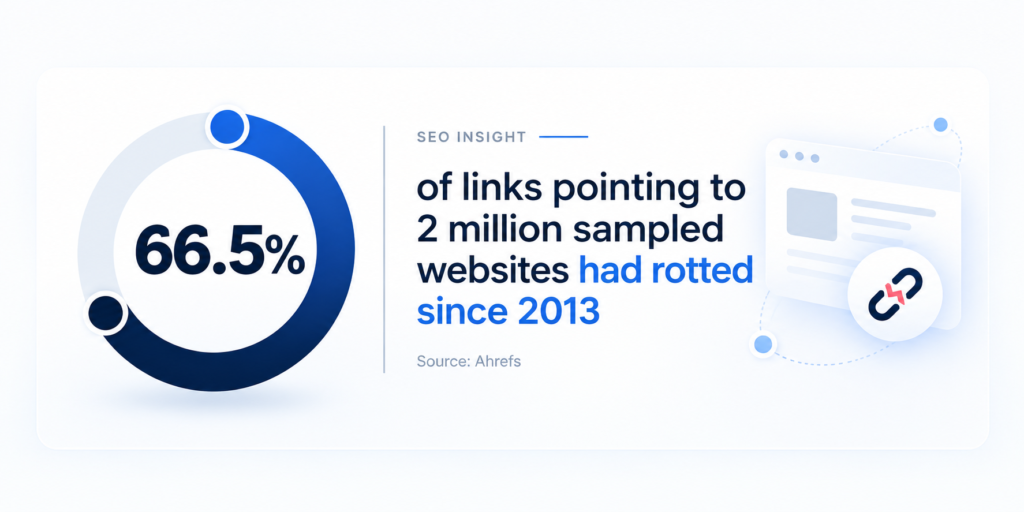
Backlinks are the part you cannot rebuild quickly. Ahrefs sampled 2,062,173 websites for its link rot study and found that 66.5% of the links pointing to them had rotted since 2013 (Ahrefs), with dropped pages behind 47.7% of lost links (Ahrefs). A changed URL with no redirect looks exactly like a dropped page to every site linking to it.
For the handful of high-authority links pointing at old URLs, we also email the linking site and ask them to update the address, the same outreach our link building services team runs for new placements. A direct link to the new URL skips the redirect hop entirely.
Map one to one, by topic
Point each old URL at the closest topical match on the new site. A discontinued product goes to its nearest replacement or its parent category, and a merged blog post goes to the post that absorbed its content. Pages with no equivalent at all can return a 404 or 410 (that is fine, and more honest than a forced redirect).
Avoid pointing hundreds of old URLs at the homepage. A visitor who clicked a link to one specific product lands on a page that tells them nothing, and Google gets no topical match to hand the old page’s signals to.
Which Redirect Type Should You Use For Changed Urls?
Use server-side 301 or 308 redirects for every URL that has moved for good. Google’s crawler documentation treats permanent redirects as a strong signal that the redirect target should be processed (Google Search Central), and 302 or 307 redirects as only a weak one. A temporary redirect left in place after launch keeps the old URL in the index longer than it should.
| Redirect | Meaning | Use in a migration |
|---|---|---|
| 301 | Moved permanently | Default for every changed URL |
| 308 | Permanent, keeps request method | Same job as 301; handy for forms |
| 302 or 307 | Temporary | Staging tests only, never the final map |
| Meta refresh or JavaScript | Client-side | Only when server access is impossible |
Server-side rules win on reliability as well. Google lists redirect methods ordered by how likely it is to interpret them correctly (Google Search Central), with server-side redirects at the top, ahead of meta refresh and JavaScript. On Apache that means Redirect 301 or RewriteRule lines in .htaccess, and on Nginx a map block (far quicker than hundreds of separate rewrite lines). WordPress sites without server access can fall back on a plugin such as Redirection or the Rank Math redirect manager, though our WordPress development team still moves anything over a few hundred rows to the server config.
Flatten redirect chains before they start
A redirect chain forms when an old URL points to another old URL that then points somewhere else. Chains creep in on sites that have been migrated twice, since nobody rewrites the rules from the first move. Google’s crawlers follow up to 10 redirect hops (Google Search Central) by default, yet each extra hop wastes crawl requests and adds load time for users, so we collapse every chain to one hop.
After the rules go live, paste the full old URL list into Screaming Frog’s list mode and crawl it. Anything that shows more than one hop or ends on a status other than 200 goes back to the developer the same day.
Launch Day Checklist For URL Changes
A good redirect map either holds or falls apart on launch day, usually because of a small config detail nobody tested on staging. We run this list in order, with one named person owning each line.
- Freeze content on the old site. No new posts or product edits in the 48 hours before launch, so the redirect map still matches what exists.
- Ship redirects with the new site. Redirects that go live even an hour after the new templates leave Googlebot crawling 404s.
- Remove staging blocks. Confirm robots.txt no longer disallows the whole site and that no noindex tag carried over from staging.
- Point canonicals and hreflang at new URLs. A canonical tag that still names an old URL contradicts the redirect sitting on top of it.
- Replace internal links at the source. Update navigation and in-content links in the database so internal clicks never pass through a redirect.
- Submit the new XML sitemap in Search Console. We also leave the old sitemap submitted for a few weeks so Google recrawls old URLs and finds the redirects sooner.
- File the Change of Address request if the domain changed. Only after the 301s are live and both properties are verified.
Item five gets skipped more than any other on this list. Redirects will catch internal links that still point at old URLs, but every click then costs an extra hop and Search Console keeps reporting the old addresses long after launch. On our website development projects the internal link replacement runs as a database search and replace on staging, before the go-live window opens, so launch day only has to verify it.
How Long Should Redirects Stay In Place After A Migration?
Keep them for at least a year, and in practice for as long as the old URLs still receive visits or links. Google’s site move guide recommends keeping redirects for as long as possible, generally at least 1 year (Google Search Central). For domain moves, the Change of Address help page asks you to maintain redirects for at least 180 days (Google Search Console Help), and longer if Google still sends traffic to the old URLs.
We default to never removing them. A redirect file of 2,000 lines costs next to nothing to keep on the server, and the backlinks pointing at old URLs do not expire on anyone’s schedule. Performance is the one exception: when a legacy rule set has grown into tens of thousands of regex lines, consolidate it into pattern rules rather than deleting rows.
Renew the old domain too. Letting it lapse after a domain migration switches off every redirect at once, and expired domains with a backlink history tend to get picked up by resellers quickly.
What Should You Monitor In The First 90 Days After Launch?
Watch the Search Console Pages report for new 404s and redirect errors, then compare indexed new URLs against old ones week by week. Organic clicks by page type and Googlebot crawl activity cover the slower signals.
| When | What to check | Where | Red flag |
|---|---|---|---|
| Week 1 | 404s and redirect errors | GSC Pages report, server logs | A high-traffic old URL returning 404 |
| Weeks 2 to 4 | New URLs indexed vs old | GSC Pages report | New URLs still missing after three weeks |
| Weeks 4 to 12 | Organic clicks by page type | GSC Performance, GA4 | One template losing clicks while others recover |
| Ongoing | Googlebot crawl requests | GSC Crawl Stats | Crawl requests falling close to zero |
Set expectations with the numbers before launch, rather than after the first dip. SALT’s data showed that around 42% of migrations took more than 12 months to return to pre-migration traffic (SALT.agency), so a flat or slightly negative quarter after a URL change sits inside the normal range. A drop concentrated in one template (all product pages, say, or every blog post published before 2022) needs a different response, and it nearly always traces back to a gap in the redirect map.
Server logs fill the gaps Search Console leaves. Filter for Googlebot requests to old URLs that return anything other than a 301, and you get an exact list of the rows the map missed, usually within the first week.
Before You Change A Single URL
A URL migration succeeds or fails on the redirect map, and that map is finished well before launch day. The teams that recover fastest change as little as possible in one release and leave their permanent server-side redirects running for years. Start with one concrete check this week: export your top 100 URLs by clicks from Search Console and hold each one against your planned new structure. Any row without a clear one-to-one destination goes on a list, and that list is your launch risk.
Frequently Asked Questions
Yes. Each changed URL has to be recrawled and reindexed before its rankings transfer, and SALT.agency’s study of 1,052 migrations put the median recovery at 304 days. Clean one-to-one 301 redirects shorten that window a lot, though they rarely remove the dip completely.
Use a 301 (or 308). Google treats permanent redirects as a strong signal to index the new URL and temporary ones as a weak signal, so a 302 slows the handover and can leave the old URL showing in results. We only use 302s on staging, and we strip them out before launch.
For a small to medium site, Google’s site move guide says most pages move within a few weeks, and larger sites take longer. Recognition and recovery run on separate clocks, though. Google can index the new URLs within a month while traffic takes far longer to return, and SALT.agency’s data shows only about one in four migrations back at full traffic inside 90 days. Submitting the new sitemap on launch day and fixing 404s in the first week both speed up recognition. If you want a second pair of eyes on the setup, our free SEO audit covers redirect and indexing checks.
You can, but we advise against it where the budget allows two releases. SALT.agency linked faster recoveries to minimal content changes at launch, so we change URLs first and ship copy and template changes four to six weeks later, once Search Console shows the new URLs indexed.
No. Google limits the Change of Address tool to moves between domains or subdomains. An HTTP to HTTPS switch on the same domain only needs 301 redirects and an updated sitemap (plus a verified HTTPS property in Search Console, if you want clean reporting).

Pooja Garg
Pooja Garg is the founder of Sky Storm Digital, a creative digital marketing agency dedicated to helping brands grow through strategy, storytelling, and design. With a passion for blending creativity and data-driven insight, Pooja writes about digital marketing trends, brand building, and the ever-evolving online landscape.
When she’s not crafting campaigns, she’s exploring new ways to connect creativity with technology.